Jobber Review 2026
By Mathurin V. · Tested hands-on, · 14-day trial on Grow features, web app

Jobber
Simple, affordable FSM for small service businesses
Jobber is the easiest, most affordable way for small home-service businesses to run scheduling, invoicing, and payments — provided you do not need a flat-rate book or inventory.
Starting price
from $49/mo
Pricing model
flat tier
Free trial
14-day free trial
Contract
Month-to-month
Our Verdict
Recommended88/100The best value in field service software for solo operators and small residential service teams — fast to learn, cheap to start, and strong on the everyday essentials.
92
Ease of use
90
Value
78
Features
85
Support
90
Mobile
Best for
- +Solo and small residential service teams
- +Owners who want fast setup and low cost
- +Businesses that mainly need scheduling and invoicing
Not for
- −HVAC shops needing a flat-rate pricing book
- −Commercial or new-construction contractors
Key takeaways from our test
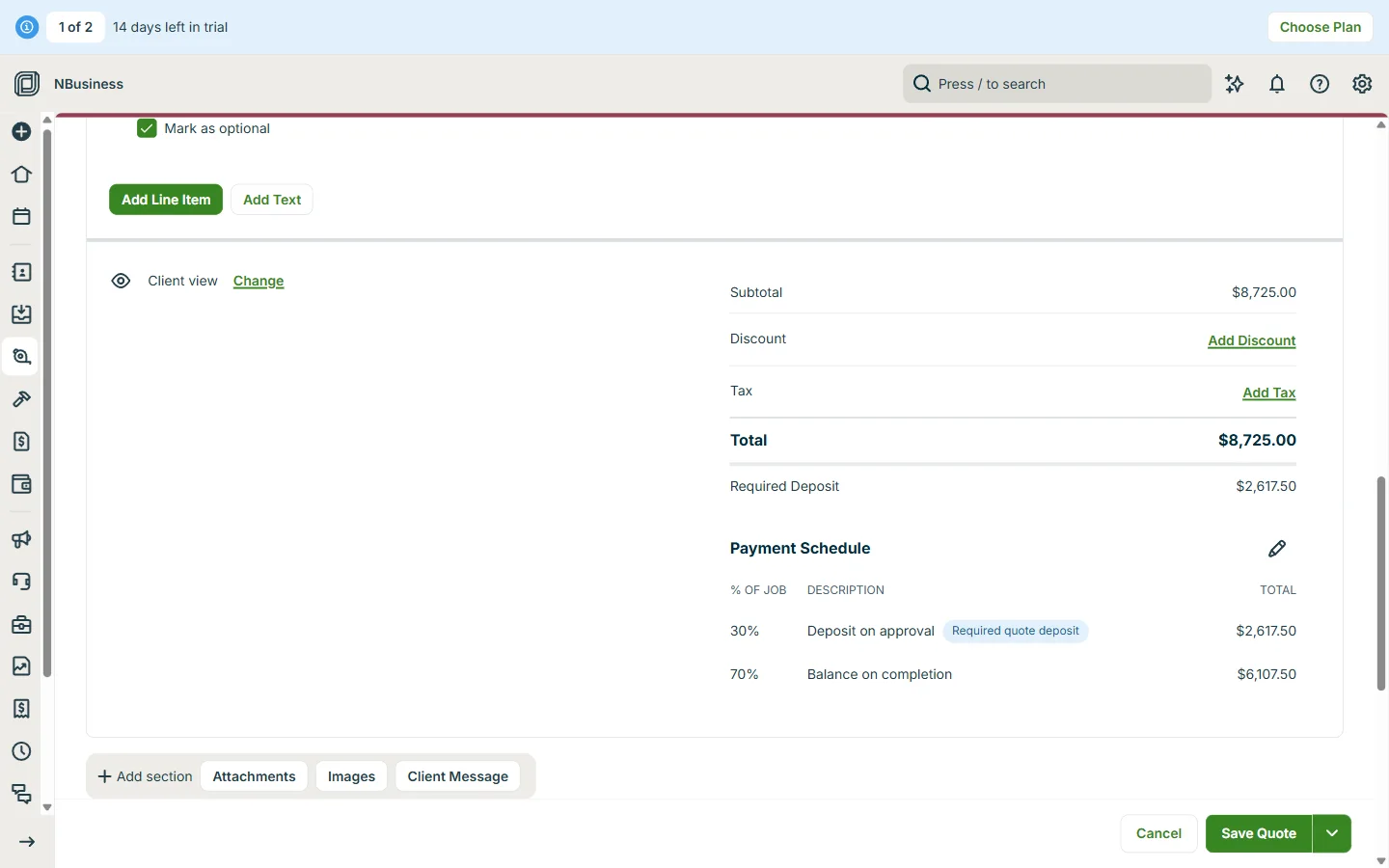
- •Quoting is the best part. Our $8,725 heat pump quote, with a 30% deposit and an optional add-on, took a few minutes, and the customer could tick the add-on and sign online.
- •A payment schedule set on the quote carries through to the job as separate deposit and balance invoices, so nothing gets typed twice.
- •The trial runs on Grow features, but text messaging stays locked until you pay, so two-way SMS can’t be tried before buying.
- •Expect a hard sell: a 20%-off countdown appears before you reach the dashboard, and taking it ends the free trial.
- •Jobber AI answered questions about our schedule and open quotes correctly. Its “rewrite” button for line items was less useful.
Signing up and first impressions
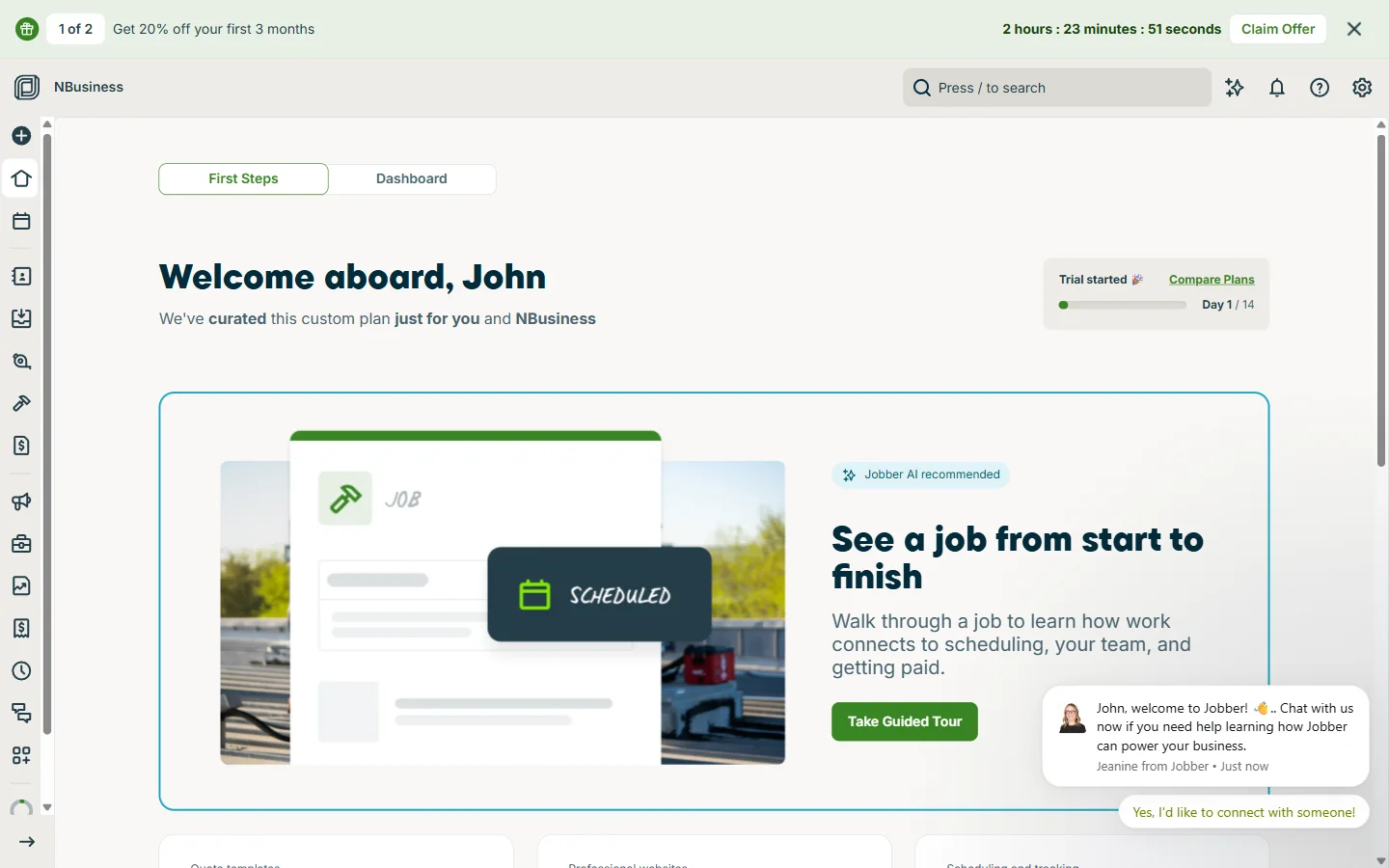
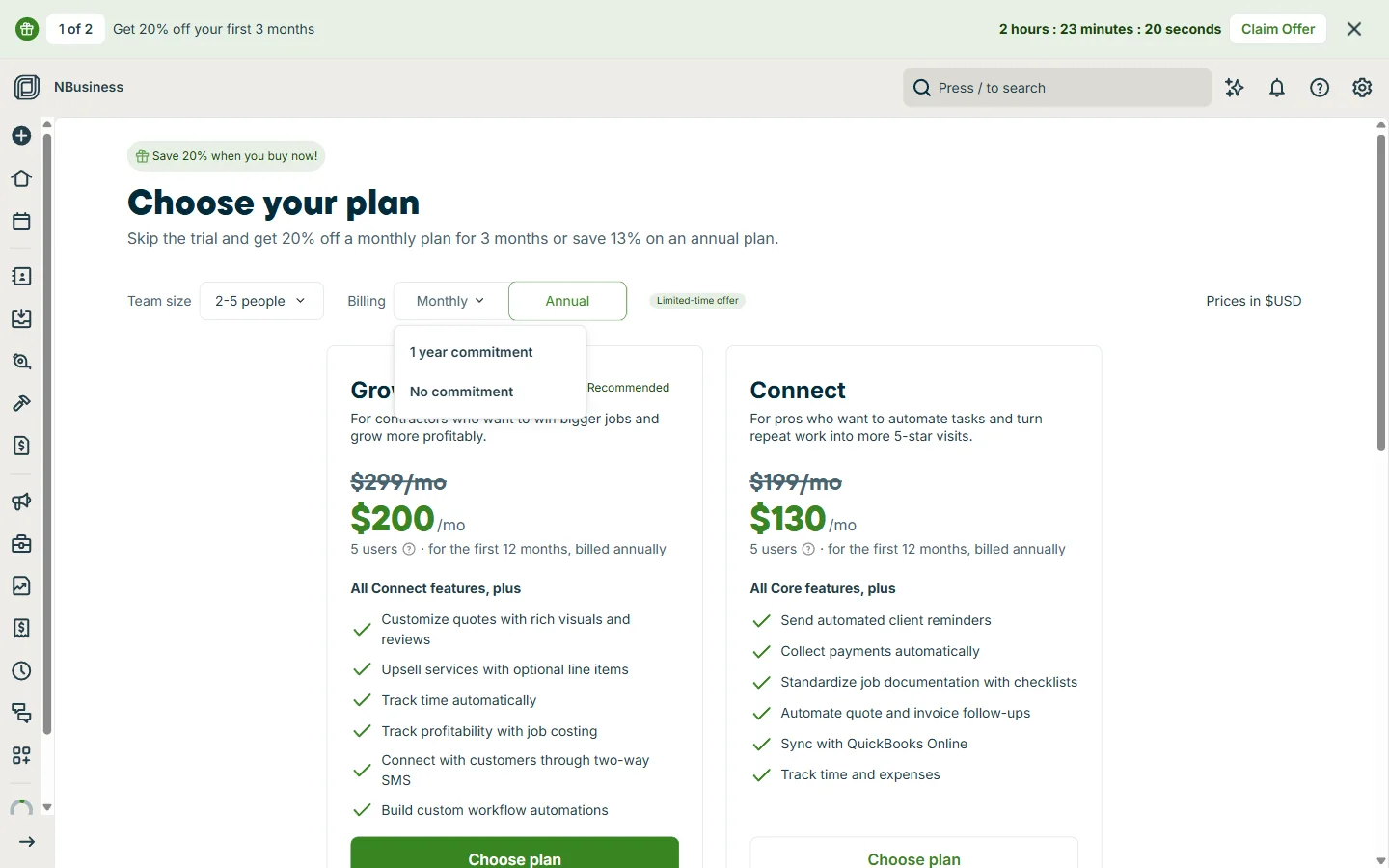
Sign-up asks for the basics, then a few short screens about your trade, team size, revenue and priorities. We picked HVAC and a crew of two to five. Before the dashboard loads, Jobber shows a “Limited Time Offer” page, and a banner counts down two and a half hours to claim 20% off. The fine print says buying during the trial ends it, so there is no reason to rush.
The first screen is a “First Steps” checklist with a guided tour, and Jobber had already added eight HVAC services (heat pump installation, duct cleaning, thermostat upgrade and so on) with descriptions but no prices. A sales chat pops up in the corner too. One thing to check if you sign up from outside the US: our account picked up Swiss francs and a European time zone from our location, and quotes showed CHF until we changed the country in Company Settings.
Quoting
We built a heat pump replacement quote for a test customer: the installation at $8,400, a $325 smart thermostat, and duct cleaning at $450 marked as optional. Picking the pre-loaded services filled in the descriptions, so the work was mostly typing prices. Optional items stay out of the total until the customer chooses them.
The deposit settings are flexible. You can ask for a flat deposit, or split the job into a payment schedule by percentage or dollar amount. We set 30% on approval, marked as required, and 70% on completion. The quote also comes with a 30-day validity line you can edit or reuse on every quote.
What your customer sees
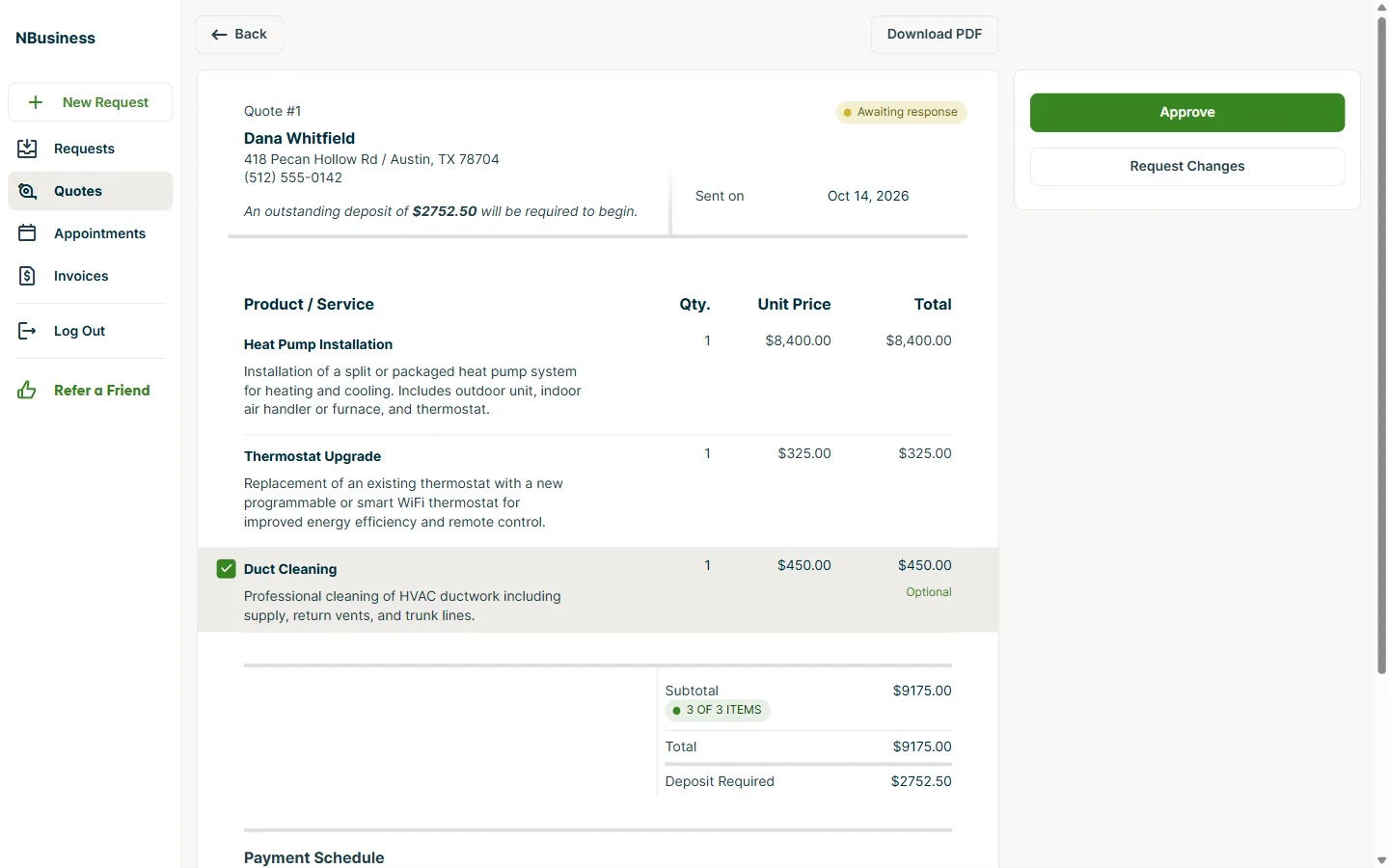
Jobber won’t send any email or text until you confirm your own email address, so do that first. The quote email itself is plain: a short message with the total, a View Quote button and the PDF attached. The button opens the customer’s Client Hub without a password.
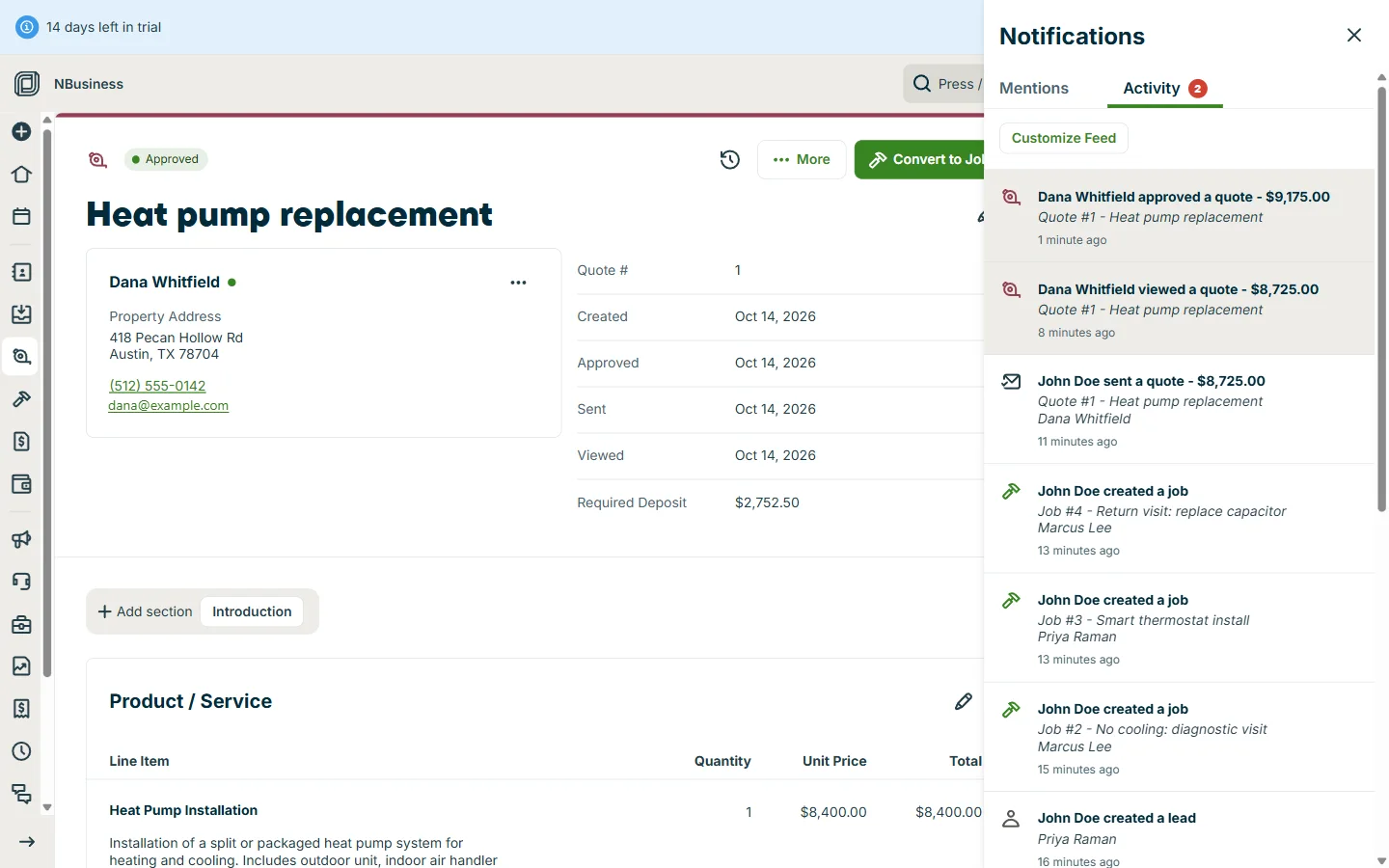
On the customer side, the optional duct cleaning had a tick box. Ticking it updated the total, the deposit and both payment-schedule lines straight away (the new figures briefly lost their thousands separator, “$9175.00”, until the page reloaded). Approval needs a typed or drawn signature. Back in Jobber, the activity feed showed the quote being viewed and then approved at the higher $9,175, and a signed PDF was attached to the quote.
One catch: the 30% deposit was marked as required, but because we hadn’t connected Jobber Payments, the customer could approve without paying it. The deposit simply stayed “outstanding”. If you rely on deposits, set up payments before you send quotes.
Jobs, maintenance plans and the schedule
Converting the approved quote to a job brought over every line item and the payment schedule, now as two invoices: $2,752.50 for the deposit and $6,422.50 for the balance. Each job line also has a unit cost field, and the job page shows revenue, cost and margin, which is Grow’s job costing.
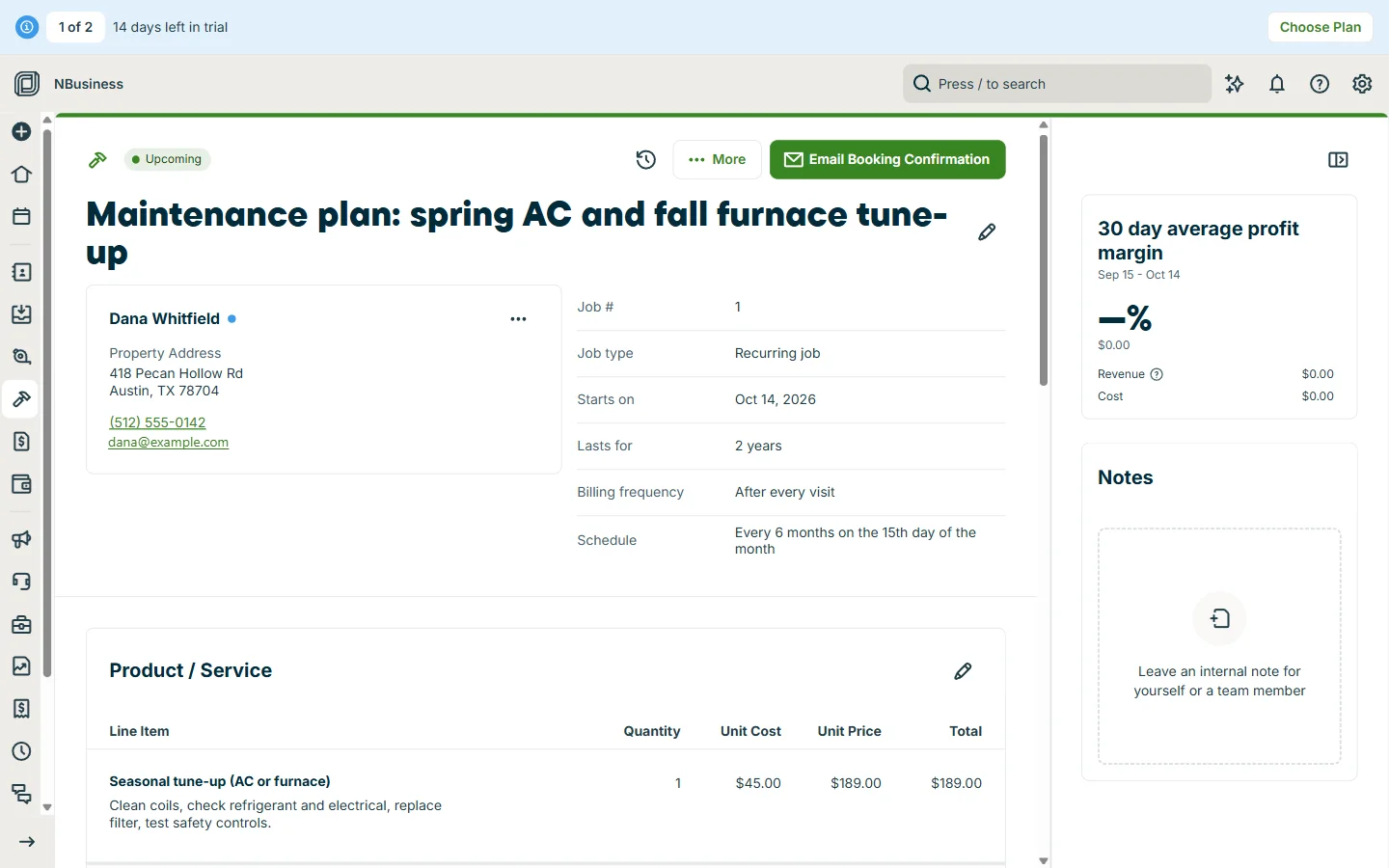
Maintenance agreements are well handled. We set up a recurring job with a custom schedule, every six months on the 15th for two years, and Jobber created the four visits and offered to invoice after each one. Automatic charging for recurring work is there too, once Jobber Payments is set up. Visit reminders go out by email a day before and an hour before, and were on by default.
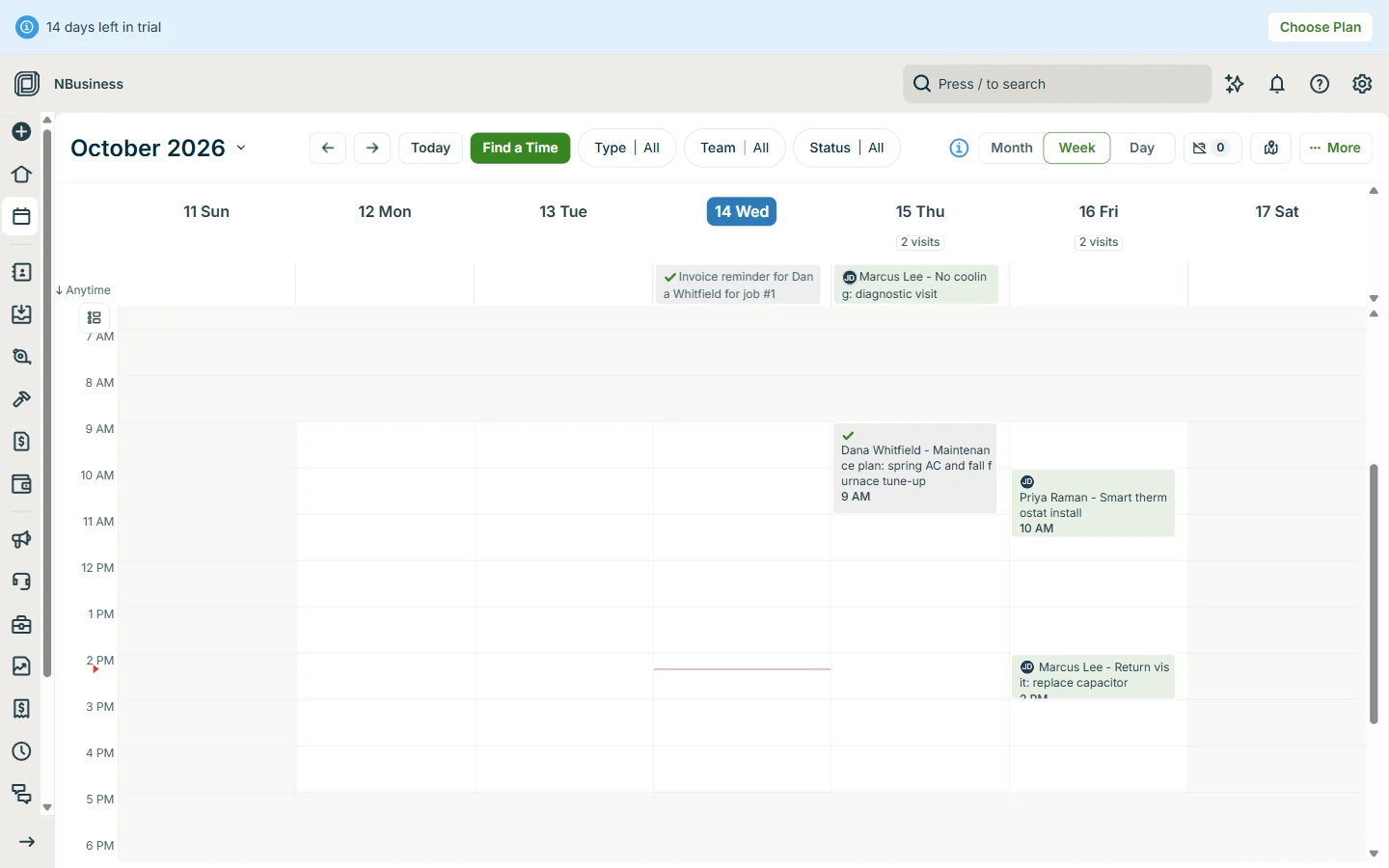
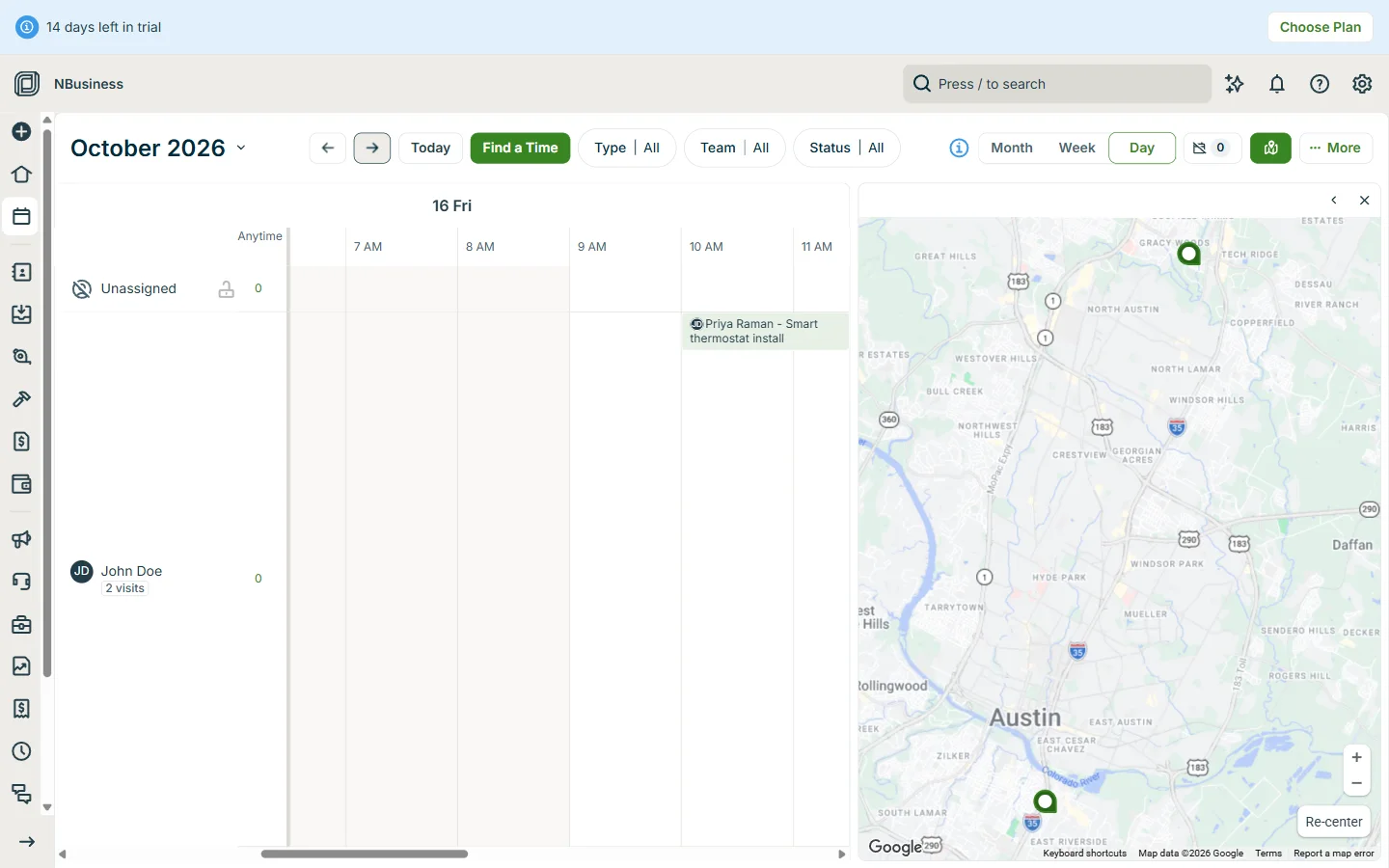
The schedule has month, week and day views. The day view gives each team member a row next to a map of the day’s stops, and there are buttons for finding an open slot and for route optimization, which we didn’t try with only one tech.
Invoicing and follow-ups
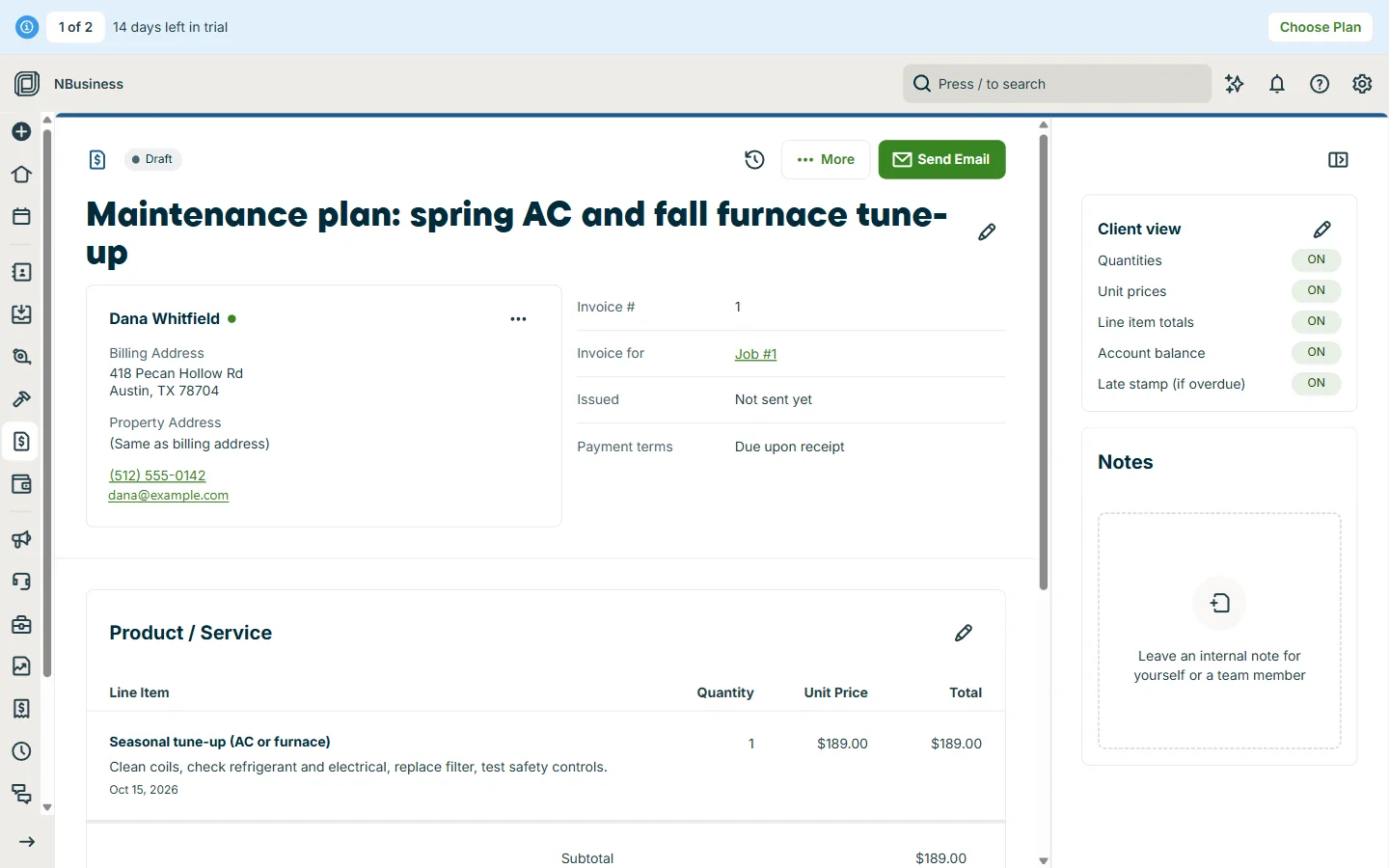
Marking a visit complete brings up a choice to create the invoice now. Jobber asks which completed visits to bill, adds the service date to each line, and defaults to due on receipt. The invoice has switches for what the customer sees, such as unit prices and account balance.
Follow-ups are already on: reminders 2 and 5 days after a quote is sent, and on the due date and 3 days after for invoices. The custom automation builder was thin in our test, offering date-based triggers only. Card payments through Jobber Payments cost 2.9% + 30¢ online and 2.7% + 30¢ in person, with bank transfers at 1%. Setting it up needs a legal business name, an SSN and a bank connection, so we didn’t test taking money.
Jobber AI
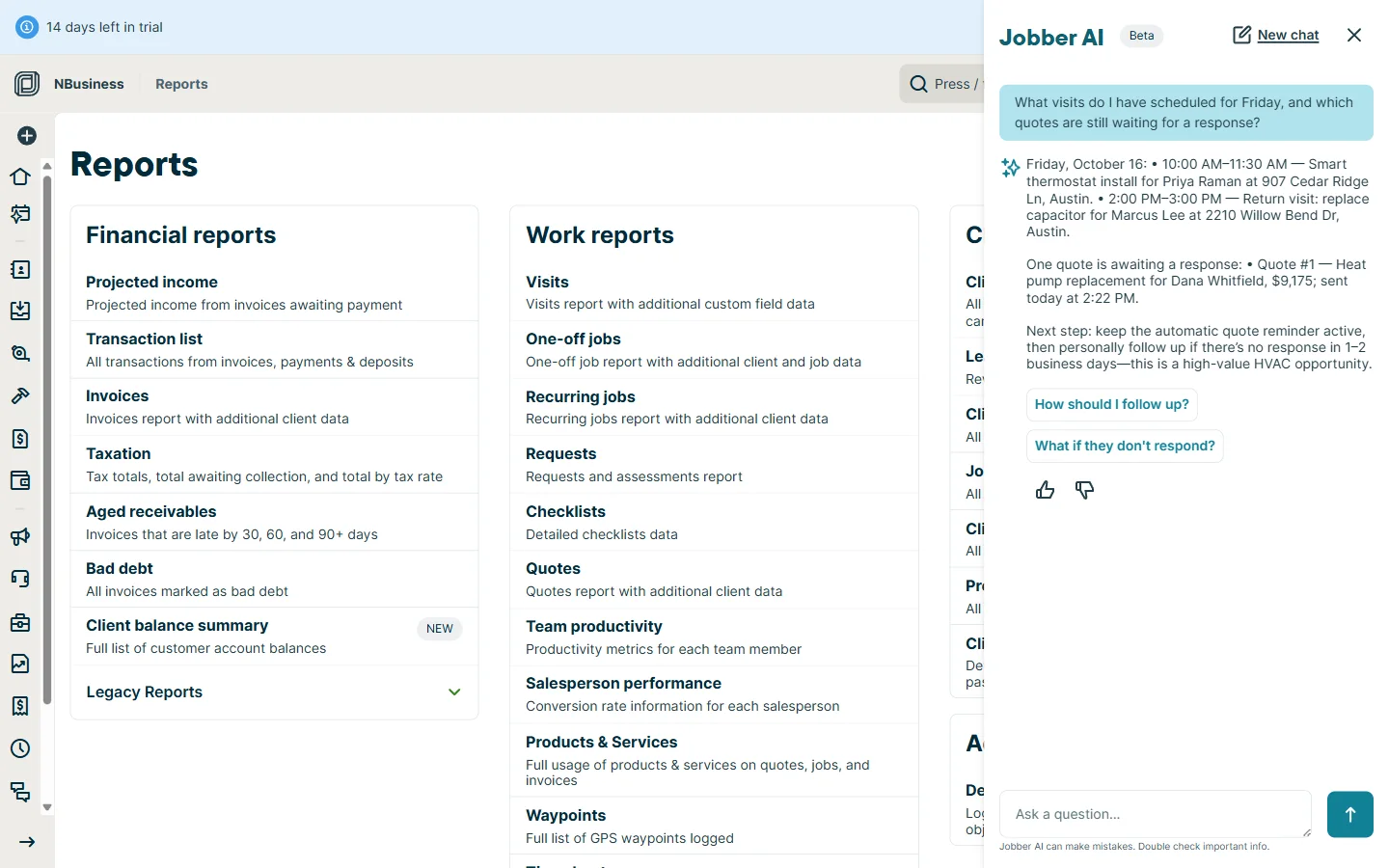
Jobber AI is a chat panel, still labelled beta, that can see your account. We asked what was booked for Friday and which quotes were waiting. It listed both Friday visits with times and addresses, and the open quote at its updated $9,175, then suggested following up if the customer didn’t respond. Everything it said was correct.
The “Rewrite” button on line-item descriptions was weaker. Asked to make our tune-up description more professional, it turned a customer-facing description into an instruction for a technician (“Please ensure that the following maintenance tasks are completed…”). We undid it. Jobber also sells an AI Receptionist that answers calls and texts, at $29 a month for 30 conversations, which we didn’t test.
What the trial won’t show you
The trial runs on Grow, Jobber’s second-highest plan, so you see job costing, optional line items and the automations. But texting is locked until you pay: Jobber’s settings say SMS features such as on-my-way texts, quote follow-ups by text and booking confirmations need a paid plan. Two-way texting is one of the main reasons to pick Grow over Connect, and you can’t try it first.
Card payments need identity checks before they work, and the Marketing dashboard was filled with sample content from other trades (a drain-cleaning review and a landscaping post for an HVAC account), so it says little about what you’d actually get.
Pros and cons
Pros
- Quotes with optional add-ons, required deposits and payment schedules
- Customers approve and sign online without a password
- Payment schedules carry from quote to job to invoices
- Flexible recurring jobs for maintenance plans, billed per visit
- Job costing on every line, with margin on the job page
- Quote and invoice follow-ups and visit reminders on by default
- Jobber AI answers questions about your own schedule and quotes accurately
Cons
- Text messaging is locked during the free trial
- Countdown upsell before you’ve used the product; buying ends the trial
- Required deposits aren’t enforced online until Jobber Payments is set up
- Custom automation builder offered only date-based triggers in our test
- The AI rewrite tool produced wording you wouldn’t send a customer
What Jobber Can Do
Jobber covers 8 of the 13 capabilities we track for field service software. A label under a ✓ means it's gated to a higher plan tier or a paid add-on.
Field operations
- ✓GPS fleet trackingConnect plan+
- —Offline modenotes & forms only
- —Inventory & truck stock
- ✓Service agreements / maintenance plans
- —Commercial job workflows
Money & accounting
- —Two-way QuickBooks sync
- ✓QuickBooks sync
- —Flat-rate price book
Customers & growth
- ✓Customer portal
- ✓Review managementPlus / add-on
- ✓Marketing toolsPlus / add-on
Scale & integrations
- ✓Multi-location supportvia Jobber Central
- ✓Open API
Jobber Pricing in Brief
Jobber publishes 4 plans, from $49 to $699 per month. It includes a 14-day free trial and month-to-month billing. Card payments are processed at 2.9% + $0.3 per transaction.
See the full Jobber pricing breakdown — every plan, per-team-size costs, fees & FAQ →
User Ratings
4.6
G2 · 479 reviews
4.5
Capterra
Compare Jobber with Alternatives
Ready to try Jobber?
Start a 14-day free trial — no card tricks, cancel anytime.
Where Jobber ranks in our guides
Before you decide
How we tested
We signed up for Jobber’s free trial on October 14, 2026 as a new HVAC business with two to five people, using made-up customers with Austin, Texas addresses. The trial ran on Grow plan features, and we used the web app in a desktop browser.
We built and emailed a heat pump quote with a deposit and an optional add-on, approved it from the customer’s side, converted it to a job, set up a twice-yearly maintenance plan, filled a week of the schedule, completed a visit and raised the invoice. We also tried Jobber AI and went through the automations, reports and payment settings.
Jobber pays us a commission when someone signs up through our links. That has no effect on the score, and this test used an ordinary trial account with nothing arranged with Jobber.
Not tested this round: the iPhone and Android apps; adding team members and assigning crews; Jobber Payments and card processing; two-way texting, which is locked during the trial; QuickBooks Online sync; the AI Receptionist and Marketing Suite add-ons; route optimization; support response times.
Jobber review FAQ
Is Jobber worth it?
Jobber is recommended (88/100 in our review). The best value in field service software for solo operators and small residential service teams — fast to learn, cheap to start, and strong on the everyday essentials.
Who is Jobber best for?
Jobber is a strong fit for solo and small residential service teams, owners who want fast setup and low cost, and businesses that mainly need scheduling and invoicing. Jobber is the easiest, most affordable way for small home-service businesses to run scheduling, invoicing, and payments — provided you do not need a flat-rate book or inventory.
What are Jobber's biggest drawbacks?
Jobber is a weaker choice for HVAC shops needing a flat-rate pricing book, and commercial or new-construction contractors. Weigh these trade-offs against the alternatives before you commit.
What are the best Jobber alternatives?
Strong Jobber alternatives include ServiceTitan. We compare the best options by team size on our Jobber alternatives page.
What can’t you test during the Jobber free trial?
The 14-day trial includes Grow plan features, but text messaging is locked until you buy a plan, so on-my-way texts, text follow-ups and two-way SMS can’t be tried. Card payments also need identity and bank verification before they work.
Can customers approve Jobber quotes online?
Yes. The quote email links to Jobber’s Client Hub, which opens without a password. Customers can tick optional items, see the total and deposit update, and approve with a typed or drawn signature. You get a signed PDF and an activity feed entry.
Does Jobber handle maintenance agreements and recurring jobs?
Yes. In our test we set a job to repeat every six months for two years; Jobber created the four visits and invoiced after each one. With Jobber Payments set up, recurring work can be charged automatically to a saved card.
Is Jobber AI useful?
The Jobber AI chat assistant answered questions about our schedule and open quotes correctly from account data. The rewrite tool for line-item descriptions was less reliable. An AI Receptionist that answers calls costs $29 a month for 30 conversations.
Reviewed by Mathurin V.
Editor, FSM Advisor. We research and compare FSM software — pricing is verified from public sources and user reports, and comparisons are updated when changes are detected.